
Frequently Asked Questions
Is WallyPark open 24 hours?
Yes, all WallyPark locations are always open and staffed 24 hours a day, seven days a week, 365 days a year. Inclement weather may affect operations and/or opening hours usually followed by the airport’s operations.
How do I find out details regarding WallyPark locations and services for specific lots?
Hover on the “Locations” tab in the top navigation to select your WallyPark location and scroll down to find lot services and amenities.
How far is WallyPark from the airport?
Each WallyPark location is close to its respective airport and offers complimentary shuttle service to and from the terminal. You’ll find helpful maps and information on each location page.
Does WallyPark offer covered parking?
Yes, some locations offer covered parking. Choose your location page from the top navigation to see if your WallyPark offers covered parking. Covered self-parking at our garages are subject to availability. Daily rate is the same for both covered and uncovered self-park at all garage locations.
How can I get directions to WallyPark?
Choose your location page from the top navigation and scroll down to the “Directions” tab for a helpful map and a direct link you can click on for navigation. For mobile users, click the directions link to open your default map application.
Does every location have WallyGuard protective door pads installed between cars?
WallyGuard™ protective pads are offered at our Los Angeles Premier Garage and Seattle Premier Garage locations.
What types of specialty services are offered at WallyPark?
To discover the exact services and amenities offered at your desired location, please select your WallyPark from the “Locations” drop down menu and scroll down to see services.
Do you have a lost and found?
Yes. Please contact your location for inquiries. Find contact information on your location page.
Does WallyPark provide motorcycle parking and riding gear storage?
Unfortunately, WallyPark does not accommodate motorcycles or storage of riding gear at this time.
Are there any height or vehicle size restrictions?
Yes, there are height and size restrictions at some WallyPark locations—especially ones with covered parking and indoor garages. Our Seattle Garage has a height limit of 8′ 2″ and most of our other garages have a 9′ height limit. If your vehicle is oversized or has a trailer, we may or may not be able to accommodate you. The daily parking rate on drive-up stays and reservations include one space only. If you have an oversized vehicle and you occupy additional space(s), additional fees will be added to your stay that must be paid upon exit. To make sure, please select the WallyPark you need from our list of locations to call or contact us.
Does WallyPark allow “in/out” parking privileges within a day of parking?
No. Parking fees are calculated from the time your vehicle enters a WallyPark location and are due at the time your vehicle departs. If you made a reservation, the total for your stay is charged at the time the reservation was made. Any overages charges will be paid at the exit kiosk.
Are WallyPark locations equipped with Electric Vehicle charging stations?
Our Atlanta, Los Angeles Premier Garage, Orlando and Seattle Premier Garage locations offer charging stations for electric vehicles. Additional fees apply. Inquire with a WallyPark team member when you arrive.
When using valet parking with EV charging at LAX Premier Garage, your vehicle must be available to our staff for at least 24 hours for a full charge. If you pick up your vehicle prior to the 24-hour minimum, no refund will be issued if your vehicle is not fully charged. 20 Tesla Gen 3 wall chargers are also available for self parking.
DOES WALLYPARK USE LICENSE PLATE RECOGNITION?
Yes, our LPR camera system captures license plate numbers and associated time/location data for security and customer experience purposes. We do not sell this data. Currently, our LAX Premier Garage and Seattle Premier Garage have LPR cameras installed.
Payment / Calculation of Fees
What are WallyPark’s rates?
Our parking rates adjust often in order to offer you competitive daily rates. For current rates, please select your WallyPark location from the top navigation bar. The daily parking rate on drive-up stays and reservations include one space only. If you have an oversized vehicle and you occupy additional space(s), additional fees will be added to your stay that must be paid upon exit.
What forms of payment does WallyPark accept?
We accept all major credit cards at every WallyPark. Sorry, cash and checks are no longer accepted.
How are WallyPark’s fees calculated?
Taxes and/or fees may apply and vary by location. WallyPark’s rates and fees are charged on a daily basis. When your travel goes into the next day, you are charged another full day. Your credit card will be charged in full when you confirm your reservation. You can also see all taxes and fees by doing a parking quote.
Our fuel surcharge helps cover the cost of fuel used to operate our shuttle transportation between WallyPark and the airport. Because fuel prices fluctuate, the surcharge amount may change periodically to reflect current fuel costs.
As of 4/1/25, Guest reservations will incur a $4.95 non-refundable reservation and technology platform fee per reservation. Join WallyClub for free to become a member and negate this reservation fee.
Who should I contact if I believe there is an error in processing my parking charges?
Please complete the form on our Contact Us page.
Shuttle Service
How often do WallyPark shuttles run?
WallyPark shuttles loop from the terminals to the lot. Use our mobile app to find directions to the pickup area and track shuttles in real time.
At our ATL location, shuttles loop every 30 minutes to the International Terminal at the bottom of the hour (ex: 5:30pm, 6:30pm, etc.) from 7:30am-11:30pm. If guests are returning after 11:30pm, please take the complimentary airport shuttle from the International Terminal to connect with the WallyPark shuttle at the Domestic Terminal. Please reserve the “Self Park, Covered International” option when booking your parking to get shuttle service to and from the international terminals.
MCO New Terminal C: Opened on 9/20/22, the new 15-gate terminal services international and domestic flights. Amenities include new concessions, a nursing station and dog relief area, plus a brand-new Walt Disney World store. Features include automated TSA checkpoint and facial recognition at gates to help improve your travel experience. WallyPark shuttles will continue to service all terminals including the new terminal C. Our shuttles also transport Brightline passengers.
How much time will I need to check-in at WallyPark before heading to the airport?
Please allow 10–15 minutes to enter the lot, park and get picked up by our shuttles. The shuttle drive time to the terminal will vary by location.
Will the WallyPark shuttle driver assist me with my luggage?
Yes, your shuttle driver will gladly assist you with loading luggage under 35 pounds on and off the shuttle upon request.
Will the Shuttle driver pick me up at my vehicle or in a designated pick-up area?
In each WallyPark location, shuttles will pick you up at a designated pick-up area. At most self-park locations, the shuttle will pick you up near your vehicle.
For LAX Customers ONLY:
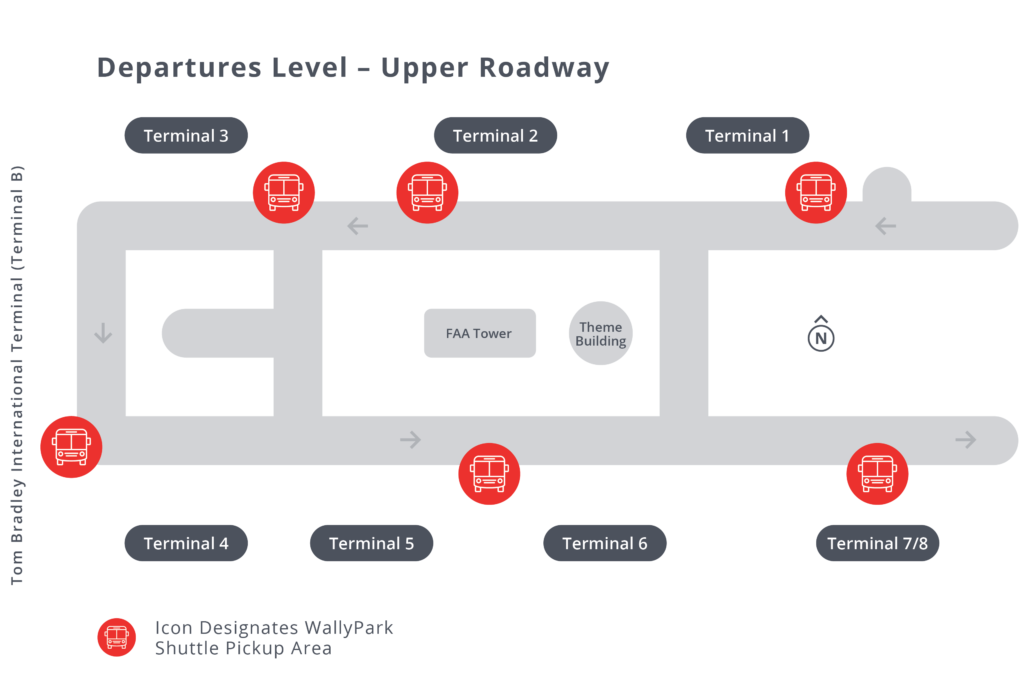
Upon returning to LAX, pick up your baggage then proceed to a RED “Hotel & Private Parking Shuttles” sign located curbside outside of tickets on the departure/upper level.
For ATL Customers ONLY:
Domestic Travelers
At South terminal baggage by carousels 8 & 9, exit door W2 and follow signage for “Shuttles: Hotels, Local and Regional. Take the crosswalk and follow signage for “Off-Airport Parking”, then take the ramp toward the lower level to D1.
International Travelers
Proceed to the lower level arrival area and wait between Doors A1 and A2. Shuttles loop every 30 minutes at the bottom of the hour (ex: 5:30pm, 6:30pm, etc.) from 7:30am-11:30pm. You may also use the International shuttle to get to the domestic terminal.
Is there a restriction on the size or weight of my luggage?
There is no restriction on the weight of your luggage. However, for safety reasons, we ask that you assist the driver with luggage that exceeds 35 pounds.
Is the shuttle service complimentary?
Yes, the shuttle service is complimentary for any WallyPark customers parking in any of our locations.
Do you have shuttles with wheelchair lifts?
Yes, we can accommodate wheelchairs on some of our shuttles. Please call your WallyPark location prior to arrival to inquire about ADA compliant shuttle availability.
Will I need to bring a car seat for my child?
No, WallyPark shuttles are exempt from seat belt and car seat laws.
Where/how do I catch your shuttle when returning from my trip?
WallyPark shuttles drive between terminals and lots/garages. When you return from your trip, you’ll see our shuttles in the ground transportation area. If you see a shuttle, please wave at the driver to let them know you are a customer. Use the WallyPark Mobile app to track shuttles in real time.
WallyClub Loyalty Program
What are the benefits of joining WallyClub?
All of the benefits of joining WallyClub are listed on the WallyClub section of our website.
How can I join your WallyClub Program?
Click here to easily register online or download the WallyPark Mobile App.
How do I earn and redeem points for free parking?
For every dollar you spend on parking, you earn one point. 10 points is worth $1 of parking that you can redeem on a future reservation in app or online toward free parking.
I did a drive-up stay instead of making an online reservation. How can I add the transaction to my WallyClub account so that I can earn loyalty points for the stay?
Please complete the form on our Contact Us page and a customer service representative will manually add your points to your WallyClub account.
I cannot access my WallyClub account, how can I reset my password?
Click here to reset your password. If a WallyClub account exists, a password reset email will be sent to the email address you entered. If you need to change the email address on file, please contact your location directly or email us.
How do I change my user email address?
Please reach out via our customer service contact form and we can change it in manually in our database.
How can I get a duplicate receipt?
If you made a reservation, you can access your receipt at any time by logging into your WallyClub account or using the mobile app. If you did not sign in during your reservation, you can look up guest reservations here. You will need the confirmation (found in your email and confirmation screen), last name and email address on the reservation.
Discount Programs
Does WallyPark offer seasonal discounts and/or discounts by location?
Yes. WallyPark offers discounts on the website home page and on each location page if applicable. Get notified about current promotions by signing up for WallyPark emails that are sent about every two weeks. You can also sign up for WallyClub for free, which will usually provide higher discounts, plus you earn loyalty points toward free parking.
Do you have a discount program in place for Travel Agents?
No, we have discontinued our Travel Agent program.
Do you have a corporate discount program?
Yes, click here to contact a member of our corporate sales team by filling out the form.
AAA
Use promo code AAA15 in the promo code field while making a reservation to receive your 15% AAA discount on parking. You will need to still show your AAA card upon checkout to validate your AAA membership. AAA discount cannot be used for drive-up stays or with any other promotional codes or offers including corporate discounts.
Senior Citizens
Use promo code SENIOR15 in the promo code field while making a reservation to receive your 15% senior discount on parking. You will need to still show a valid ID upon checkout to validate eligibility. You must be 65 years of age or older to receive the senior discount. The senior discount cannot be used for drive-up stays or with any other promotional codes or offers including corporate discounts.
Military Discounts
Use promo code MIL25 in the promo code field while making a reservation to receive your 25% Military discount on parking. You will need to provide a valid active or veteran military ID upon checkout to prove eligibility. Our military discount cannot be used for drive-up stays or with any other promotional codes or offers including corporate discounts. Discount excludes valet parking at LAX Garage and International Parking at Atlanta.
Government Discounts
Use promo code GOV25 in the promo code field while making a reservation to receive your 25% Government Employee discount on parking. You will need to provide a valid government employee ID upon checkout to prove eligibility. Our government employee discount cannot be used for drive-up stays or with any other promotional codes or offers including corporate discounts. Discount excludes valet parking at LAX Garage and International Parking at Atlanta.
Mobile App Questions
Do I need an online WallyClub account to use the WallyPark Mobile App?
Yes, you must log in with your loyalty credentials to access the mobile app functions. If you only have a physical WallyClub card, you will need to sign up for an online WallyClub account to use the mobile app and the benefits of WallyClub. We no longer use physical WallyClub cards.
How do I create a WallyClub account?
Either online here or via the mobile app. Our customer service team can also help you set up your free account.
I forgot my password. How do I retrieve it?
Simply open the app, tap “Forgot Password?” on the login screen and enter your user email address. If there is an account associated to the email you entered, you will receive and email shortly with directions on how to reset your password. Due to privacy laws, WallyPark cannot look up or see your account password but we can reset it for you.
What is the difference between online, promo and corporate rates?
The regular online rate shown in red is our normal website daily parking rate. If you apply a promo code, the rates will turn teal and are now shown with the calculated discount and specified as a promo rate. Your negotiated corporate rate is shown in dark blue, but only if your profile is connected to your employer’s corporate discounted rate. Please note: corporate customers cannot use most promo codes on their already discounted rates.
How do I apply a promo code to my reservation?
Once you have selected your parking type, simply tap on “Apply Promo” instead of continuing. You can either manually enter in a promo code or if you are opted in to receive marketing email offers, any current offer will be listed for you to select. Once you have applied your promo code, you will see the rates calculated with your discount and change to a teal promo rate.
How do I add additional car services to my reservation?
Car care services are currently only offered with valet parking at WallyPark LAX Premier Garage but cannot be added to a reservation. Please request services when you arrive.
How do I pay for my pre-paid reservation on the app?
At this time, you must save a credit card to your profile to pay for a reservation using the app. When you save a card, you will see a $1.00 charge pending on your billing register ONLY for the purpose of verifying your credit card. This charge will be removed within 7-10 business days. During check-out, you need to select a saved card to use for payment. You can save up to three credit cards in your profile.
What is your pre-paid cancellation policy I must agree to before checking out?
You may cancel your pre-paid reservation up to four (4) hours BEFORE your reservation starts. You cannot be credited for days unused and you cannot get a refund on reservations that have already started. The non-member booking fee is non-refundable.
How do I get picked up?
Use the Real Time Shuttle tracker to track shuttles and get directions to the shuttle pickup area. You can also find pickup instructions on the individual location page on our website.
How do I view shuttle pick-up locations at my terminal?
Directions to the Pickup areas are in the shuttle tracking area of the app. You will see shuttles moving in real time between the pickup area and the WallyPark lot/garage.
How do I get to your pick-up location(s)?
On the “Shuttle Pick-up” tab, select “Tap for Directions to Shuttle Pick-up Location” near the top of the screen. For some locations, you may need to select which lot you parked in. A dropdown will appear with walking directions to the shuttle pick-up area when you return to the airport.
How do I redeem my WallyClub points?
Tap on the “WallyClub” tab at the bottom of your app screen to show your point balance, point history and a “Redeem Now” button. You can also redeem your WallyClub points through checkout. You may only use as many points as needed to cover your sub-total. Any applicable taxes and fees cannot be paid with loyalty points.
How can I edit my profile information?
Tap on the “Menu” tab on the lower right corner of your screen. On top, select “View Profile” to view and edit your information. Note: If you need to change your user email address, please contact customer service to process that request in our database.
How do I add my employer’s corporate discounted rate to my profile?
Upon sign up or while editing you profile, simply enter your work email address into the work email field. If your work email domain matches an employer in our system, your corporate discount will automatically be applied to your profile. If your email domain does not match, delete your work email out of the field to continue and reach out to customer service. If you have a domain match, you may need to log out and log back into the app or tap the “Refresh Profile” button to see your employer listed on your profile. If your employer is interested in becoming a corporate partner, please fill out the form here and one of our corporate account managers will reach out.
How do I cancel a reservation?
Tap on the “Menu” tab on the lower right corner of your screen and select “Manage Reservations” to see your reservation history. Simply tap on the reservation you wish to cancel and follow the on-screen instructions, which must be done within four (4) hours of your reservation start time. Funds will be credited back to your card within 7-10 business days depending on your financial institution.
How can I contact WallyPark while using the app?
Tap on the “Menu” tab on the lower right corner of your screen and select “Contact Us”. Here, you will be re-directed to our website to fill out our contact form to our Customer Service department. Or, you can tap on the “Phone Number” tab to pull up each WallyPark location’s phone number. Tap the phone icon next to the location you are trying to contact to open the click-to-call feature.
How can I get directions to my WallyPark location?
Tap on Menu in the bottom right navigation bar, then Find a WallyPark. Scroll down the screen to find your WallyPark. Tap the red “View” button next to your WallyPark location and expand the lot’s details. This screen will have parking options, current rates and a directions link that will open your device’s default map application.
Why are buttons missing or text overlapping on my iPhone?
If your iPhone text size or Display Zoom settings are set larger than default, it may affect how certain screens appear in the app. If your settings are set to:
Settings > Display & Brightness > Display Zoom > Larger Font
We recommend using one of these alternative ways to increase font size of your device without affecting the WallyPark app’s layout:
Settings > Display & Brightness > Text Size > Slide scale to the right to increase font size
OR
Settings > Accessibility > Display & Text Size > Larger Text > Toggle ON > Slide scale to the right to increase font size
Prepaid Reservation Questions
(Services and procedures may vary by WallyPark location)
Once I have made a reservation, how do I enter and exit the lot?
All WallyPark locations are now ticketless. You can scan in and out of the lot with your reservation QR code found in your mobile app, reservation confirmation page or on your email confirmation. If you have any problems, push the help button on the kiosk and someone will assist you. Any overage charges will be due upon exit at the kiosk.
Do I need to bring a printed copy of my Reservation?
No. You can scan the digital reservation QR code in the WallyPark app or on your confirmation email. If you made a reservation with one of our third-party partners, such as CheapAirportParking.com, AirportParkingReservations.com/Best Parking, Spot Hero, or Park Whiz; a reservation must always be presented to show proof of purchase but it does not need to be printed.
How do I cancel my reservation?
Your reservation number is located in your confirmation email or mobile app. Cancelations can be made within four (4) hours of your reservation date/time start. No refund will be issued for cancellations after this deadline. To cancel a reservation, please go to our website and click the hamburger menu. Click the “Cancel Reservation” link in the menu and follow the steps. The cancelation link is also in our website footer. You can also log in to our website with your WallyClub account or the mobile app to cancel there. You are not able to edit a reservation at this time. You must cancel your old reservation and create a new one.
I have made my reservation and will not be parking as long as anticipated. Will I receive a refund for these unused days?
No refund will be issued for unused days. You will need to cancel your reservation at least four (4) hours before the start time and make a new reservation for the correct number of days. If there was an emergency, please contact customer service.
I pre-paid my parking and have had to extend my trip. How do I pay for the additional days?
If you have an overstay on a reservation that has already been paid, the exit kiosk will calculate your additional stay at posted rates. Follow on-screen instructions to pay your overage at the exit kiosk.
Why do I get charged for a full day for the time I stay past my reservation when I only stay a few hours over?
If you stay beyond your reservation, the charges are determined based on the hourly rate of the particular lot at which you parked. When the number of hours you stayed over times the hourly rate would exceed the daily rate, you are charged the daily rate.
Do I need to contact WallyPark or the lot at which I will be parking to confirm my booking?
No, your stay is confirmed with WallyPark when you make a reservation. You will see your reservation number on the confirmation screen and you will receive a confirmation email.
When will I receive my confirmation?
You receive your confirmation two ways. At the end of the booking process a confirmation screen will display showing your booking details that you may print or save. You will also receive an email confirmation shortly. If you do not receive your email confirmation, please check your spam folder.
Why do I have to provide my email address?
Your confirmation will be sent to the email address provided. We also use your email address to look up your reservation details if you misplace your confirmation number.
I don’t have an email address. Can I still make a reservation?
No. An email address is required to make a reservation. If you don’t have an email address, we offer drive-up stays but spaces and rates are not guaranteed.
For how many days can I make my reservation?
We do not have a limit on the number of days you can make in a reservation. As indicated below, if you will be parking for over thirty days, please notify the lot staff when you arrive.
Is there a maximum number of days I can stay?
No, however if you expect to be staying more than 30 days you should notify a lot employee so that your vehicle is not considered abandoned. Vehicles parked for over thirty days without notifying lot management may be towed at the owner’s expense.
When is my credit card billed for my reservation?
Your credit card is charged in full when you make your reservation.
Is my credit card information secure?
Yes, our website and mobile applications are secure to ensure your credit card information is safe. We only store credit card information if you save a card to your WallyClub profile.
I was charged twice after exiting the parking facility. How do I get a refund?
To arrange a refund, please reach out to customer service via the Contact Us form.
When should I expect to receive my refund?
It will usually take 7-10 business days depending on the processing time of your credit card provider.
You can charge my account instantly. Why does it take longer to credit my account?
This is dictated by the time it takes the merchant services company and your credit card company to process the refund. Your refund is submitted immediately by us, but there is often a delay by the merchant service or credit card company in crediting the account. This is the case with all credit card refunds throughout the industry.
Can I pay with cash or a check when booking my airport parking online?
All major credit cards are accepted when booking online. We cannot accept cash or a check at the lots or for reservations.
I have made my reservation and want to use a coupon when I return from my trip. Is this possible?
No, the rate you have secured when making your reservation does not allow you to use additional coupons. Coupons can only be used when you drive up without a reservation. Only one promotional code can be redeemed online when initially making your reservation. Promo codes cannot be used on drive up stays.
Why can’t I see the parking option that I am looking for? It was there last week.
Each parking option has a limited number of reserved parking spaces. Sold-out spaces are removed from the reservation process or could have been a discontinued parking option.
I have lost my confirmation. How do I get a copy?
If you need another copy of your email confirmation sent to you, use the mobile app or sign into your account on WallyPark.com to find your reservation under your reservation history. Open the details and click the “Resend Confirmation Email” button.
WallyClub Loyalty Program Questions
How do I become a WallyClub member?
Click here to enroll online in the WallyClub Program or sign up easily on our mobile app.
How do I redeem my WallyClub points?
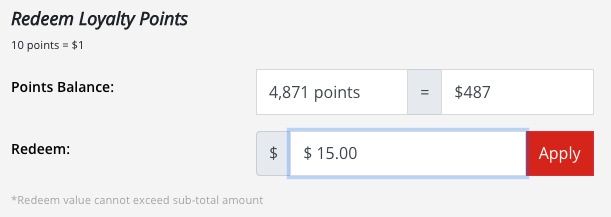
On your reservation payment page, simply choose the dollar amount you wish to use from the dropdown. Your point value will automatically applied in the price summary. For every dollar spent on parking, you earn one (1) point. Ten (10) points equal $1.00 for redemption toward parking. You can view and redeem your points in the WallyPark App or your online account.
Do all WallyPark lots participate in the WallyClub Loyalty program?
All company-owned or operated lots participate in the WallyClub Loyalty Program. Network Affiliates and Third Party Aggregator sites are independent businesses and do not participate in the program. Trips booked through them do not earn you points towards free days.
I have forgotten my password and have requested a new one to be sent to me, but I have not received this in my email. What do I do?
The email may have been caught by your junk and SPAM mail filters. Please check your junk mail or SPAM folders for an email from “donotreply@spacegenius.com” or contact Customer Service to reset your password.
Can I link my AAA card, Senior Discount or military discount to my WallyClub Profile?
No, these discounts are not automatically connected to your profile. When you reserve parking online or with the app, use the appropriate discount code below to apply your discount. Please have your ID ready at the lot to show you qualify for the discount. Discounts exclude valet parking at LAX Garage and International Parking at Atlanta.
AAA
You are unable to link your AAA discount to your profile, however, use promo code AAA15 while making a reservation to receive a 15% discount. You will need to show your AAA card at the exit kiosk.
Senior Citizens
You are unable to link your Senior discount to your profile, however, use promo code SENIOR15 while making a reservation to receive a 15% discount. You will need to show a valid driver’s license at the exit kiosk. You must be 65 years of age or older to receive the 15% senior discount.
Military Discounts
You are unable to link your Military discount to your profile, however, use promo code MIL25 while making a reservation to receive a 25% discount. You will need to show your Military ID at the exit kiosk.
Government Employees
You are unable to link your Government discount to your profile, however, use promo code GOV25 while making a reservation to receive a 25% discount. You will need to show your Government ID at the exit kiosk.
Do my loyalty points expire?
No, at this time, loyalty points do not expire.
If I make a reservation with a third party, can I receive points?
The WallyClub loyalty program is only available when you book directly on WallyPark.com or on our mobile app. Third-party reservations do not accrue loyalty points.
I work for a company that participates in your Corporate Discount Program. How do I tie my corporate discount to my WallyClub Profile if I am already a member?
To add your employer, edit your profile and enter your work email address into the work email field. If your work email domain matches an employer in our system, your corporate discount will automatically be applied to your profile. If your email domain does not match, delete your work email out of the field to continue and reach out to customer service. If your employer is interested in becoming a corporate partner, please fill out the form here and one of our corporate account managers will reach out.